Article
Build a chatbot that answers from your own PDFs in Python
Retrieval-augmented generation in plain Python: split a PDF into chunks, find the relevant ones, and let Claude answer using only those. No vector database required.
On this page0%
- How it works
- What you need
- Step 1 — Read the PDF
- Step 2 — Split into overlapping chunks
- Step 3 — Turn text into vectors
- Step 4 — Retrieve the best chunks
- Step 5 — Ask Claude, using only those chunks
- Step 6 — Wrap it in a chat loop
- Step 7 — Save the index so startup is instant
- Making it better
- Common problems (and fixes)
- What you learned
- FAQ
- How do I build a RAG chatbot over my own PDFs in Python?
- Do I need a vector database for RAG?
- What chunk size should I use for RAG?
- Why does my RAG bot give wrong answers?
- How do I stop the model making things up?
- Next reading on Sythra Articles
A language model does not know what is in your PDF. You have two options: paste the whole document into every question, or find the handful of relevant paragraphs and send only those.
The second approach is called RAGRetrieval-Augmented Generation — find relevant text first, then let the model answer using it. It is cheaper, more accurate, and works on documents far larger than any context window.
You do not need LangChain or a vector database to start. This guide builds a working version in about a hundred lines of ordinary Python.
How it works
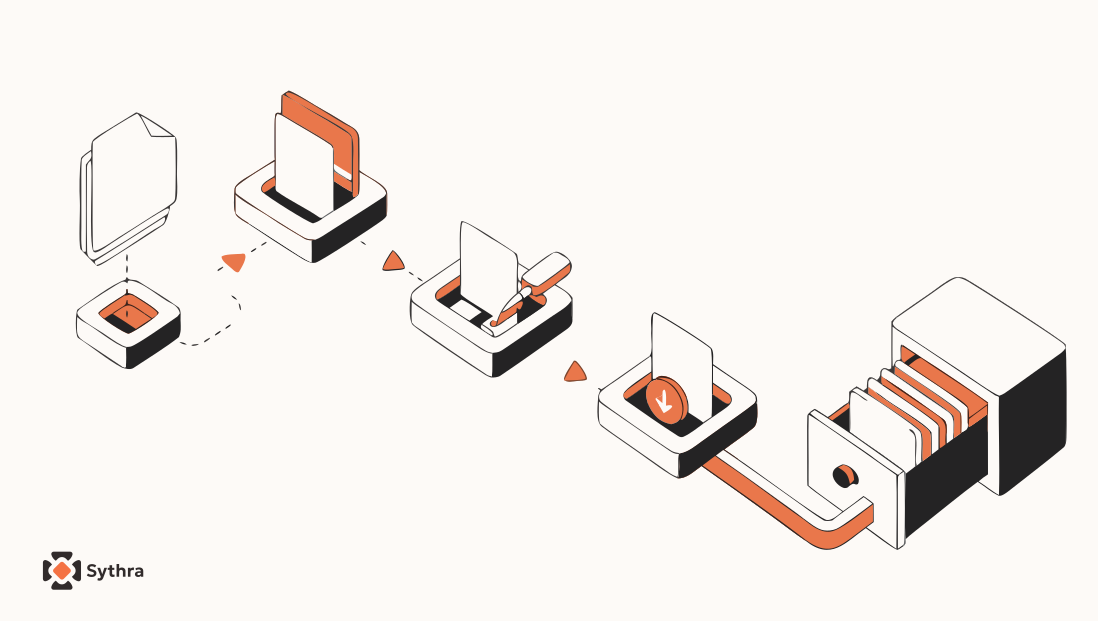
- Split the PDF into overlapping chunks of a few hundred words
- Embed each chunk — turn it into a list of numbers capturing its meaning
- Search by embedding the question and finding the closest chunks
- Answer by sending only those chunks to the model with the question
Steps 1–3 are ordinary Python. Only step 4 calls an API.
What you need
python -m pip install anthropic pypdf numpy
Get an API key from the Anthropic Console and set it as an environment variable — never paste it into your code:
# Windows PowerShell
setx ANTHROPIC_API_KEY "sk-ant-..."

# macOS / Linux
export ANTHROPIC_API_KEY="sk-ant-..."
New to calling models from Python? Start with talk to an AI from Python in 20 lines.
Step 1 — Read the PDF
from pypdf import PdfReader

def read_pdf(path):
    reader = PdfReader(path)
    pages = []
    for number, page in enumerate(reader.pages, start=1):
        text = (page.extract_text() or "").strip()
        if text:
            pages.append({"page": number, "text": text})
    return pages


pages = read_pdf("handbook.pdf")
print(f"{len(pages)} pages with text")
Keep the page number. When the bot answers, you can cite where it found the information — the difference between a demo and something people trust.
If extract_text() returns nothing, the PDF is a scan rather than real text. Run it through OCR first using our text-from-image guide.
Step 2 — Split into overlapping chunks
Chunks that are too large waste tokens and bury the answer. Too small and they lose context. Around 800 characters with 150 characters of overlap works well for most documents:
def chunk_pages(pages, size=800, overlap=150):
    chunks = []
    for page in pages:
        text = page["text"]
        start = 0
        while start < len(text):
            piece = text[start:start + size]
            if piece.strip():
                chunks.append({"page": page["page"], "text": piece.strip()})
            start += size - overlap
    return chunks


chunks = chunk_pages(pages)
print(f"{len(chunks)} chunks")
The overlap matters. Without it, a sentence split across two chunks belongs fully to neither, and the retriever misses it.
Step 3 — Turn text into vectors
An embeddingA list of numbers representing meaning, so similar texts sit close together lets you compare meaning rather than exact words. A question asking about "time off" then matches a paragraph about "annual leave".
Start with the simplest thing that works — TF-IDF from scikit-learn, no API calls, no cost:
from sklearn.feature_extraction.text import TfidfVectorizer

texts = [c["text"] for c in chunks]
vectorizer = TfidfVectorizer(stop_words="english", ngram_range=(1, 2))
matrix = vectorizer.fit_transform(texts)
This matches on shared words, not meaning — good enough for manuals and technical documents where terms are consistent. Upgrade to a neural embedding model later if synonyms matter for your content; the rest of the pipeline stays identical.
Step 4 — Retrieve the best chunks
from sklearn.metrics.pairwise import cosine_similarity

def search(question, top_k=4):
    query_vec = vectorizer.transform([question])
    scores = cosine_similarity(query_vec, matrix)[0]
    best = scores.argsort()[::-1][:top_k]
    return [(chunks[i], float(scores[i])) for i in best if scores[i] > 0]


for chunk, score in search("How many holidays do I get?"):
    print(f"p{chunk['page']} ({score:.2f}): {chunk['text'][:90]}...")
Cosine similarityA score from 0 to 1 for how similar two vectors point measures direction rather than length, so a long chunk is not favoured over a short one just for having more words.
Print these results while building. If retrieval returns the wrong paragraphs, no model can save the answer — and this is where almost every disappointing RAG bot goes wrong.
Step 5 — Ask Claude, using only those chunks
import os
import anthropic

client = anthropic.Anthropic(api_key=os.environ["ANTHROPIC_API_KEY"])

SYSTEM = (
    "You answer questions about a document. "
    "Use only the provided context. "
    "If the answer is not in the context, say you could not find it. "
    "Cite page numbers like (p. 4)."
)

def ask(question):
    hits = search(question)
    if not hits:
        return "Nothing relevant found in the document."

    context = "\n\n".join(
        f"[page {c['page']}]\n{c['text']}" for c, _ in hits
    )

    message = client.messages.create(
        model="claude-sonnet-5",
        max_tokens=800,
        system=SYSTEM,
        messages=[{
            "role": "user",
            "content": f"Context:\n{context}\n\nQuestion: {question}",
        }],
    )
    return message.content[0].text


print(ask("How many holidays do I get?"))
The system prompt is doing real work here. "Use only the provided context" and "say you could not find it" are what stop the model inventing a confident answer when your retrieval missed.
Step 6 — Wrap it in a chat loop
def chat():
    print("Ask about the document. Type 'quit' to exit.\n")
    while True:
        question = input("You: ").strip()
        if question.lower() in {"quit", "exit", ""}:
            break
        print("\nBot:", ask(question), "\n")


if __name__ == "__main__":
    chat()
Step 7 — Save the index so startup is instant
Rebuilding the index on every run is slow for large PDFs:
import joblib

joblib.dump({"chunks": chunks, "vectorizer": vectorizer, "matrix": matrix},
            "index.joblib")

saved = joblib.load("index.joblib")
chunks, vectorizer, matrix = saved["chunks"], saved["vectorizer"], saved["matrix"]
Index once, query forever. Rebuild only when the document changes.
Making it better
| Symptom | Fix |
|---|---|
| Answers miss obvious facts | Increase top_k from 4 to 6 |
| Answers are vague | Reduce chunk size to 500 characters |
| Context loses the thread | Increase overlap to 250 |
| Model invents things | Strengthen the system prompt; show retrieved text |
| Synonyms are missed | Switch TF-IDF for a neural embedding model |
| Slow on huge PDFs | Save the index; consider FAISS beyond ~50k chunks |
Common problems (and fixes)
| Problem | Fix |
|---|---|
extract_text returns empty | Scanned PDF — run OCR first |
KeyError: 'ANTHROPIC_API_KEY' | Environment variable not set in this terminal |
| Answers ignore the document | Check retrieval output before blaming the model |
| Cost climbing | Lower top_k and max_tokens |
What you learned
- RAG is retrieve-then-generate, not one giant prompt
- Overlapping chunks stop answers falling between the cracks
- TF-IDF retrieval is enough to get started
- Cosine similarity ranks chunks by meaning, not length
- The system prompt is what keeps answers grounded
FAQ
How do I build a RAG chatbot over my own PDFs in Python?
Extract the text with pypdf, split it into overlapping chunks, index them with TF-IDF or embeddings, retrieve the few chunks closest to the question, and send only those to the model along with the question.
Do I need a vector database for RAG?
Not to start. TF-IDF or an in-memory NumPy array handles thousands of chunks comfortably. Reach for FAISS or a hosted vector database only when you exceed roughly fifty thousand chunks.
What chunk size should I use for RAG?
Around 800 characters with 150 characters of overlap suits most documents. Use smaller chunks for dense reference material and larger ones for flowing prose.
Why does my RAG bot give wrong answers?
Usually retrieval, not generation. Print the retrieved chunks for each question — if the right paragraph is not in that list, the model never had a chance to use it.
How do I stop the model making things up?
Instruct it in the system prompt to use only the supplied context and to say clearly when the answer is not there, then display the retrieved passages alongside the answer so users can verify.